

Why Document Categories Matter More Than Most Organizations Realize
As organizations grow, so does the volume of employee documentation. Every hiring cycle, salary revision, policy update, and performance review generates new records that need to remain accessible throughout the employee lifecycle.
Many organizations initially organize documents using shared folders or basic directory structures. While this approach may work for smaller teams, it becomes increasingly difficult to maintain consistency as employee numbers, business units, and locations expand.
A well-defined document category structure helps HR teams:
- Find documents more quickly
- Maintain consistent document organization
- Reduce duplicate records
- Improve collaboration across HR teams
- Support governance and compliance
- Deliver faster responses to employee requests
Rather than treating document storage as an administrative task, organizations are increasingly viewing document categorization as a critical part of HR operations.
Common HR Document Categories
Although every organization has unique requirements, most employee documents fall into several core categories.
Recruitment Documents
Documents generated during the hiring process, including:
- Job applications
- Interview evaluations
- Offer letters
- Employment contracts
- Background verification documents
Onboarding Documents
Documents required during employee onboarding, such as:
- Identity verification
- Tax declarations
- Policy acknowledgements
- Employee handbooks
- Joining documentation
Employment Records
Documents maintained throughout employment, including:
- Confirmation letters
- Salary revision letters
- Promotion letters
- Transfer letters
- Performance reviews
- Training certifications
Compliance Documents
Organizations often maintain dedicated categories for compliance-related documentation, including:
- Regulatory acknowledgements
- Mandatory training records
- Compliance certifications
- Policy acceptance records
- Audit documentation
Separation and Exit Documents
Employee offboarding generates another important set of documents:
- Resignation letters
- Exit interviews
- Clearance forms
- Experience letters
- Final settlement documentation
Organizing these document categories consistently makes it easier for HR teams to retrieve employee records while maintaining governance across the organization.
Building a Scalable Folder Structure
Document categories become even more effective when supported by a logical folder structure.
Instead of creating folders based solely on departments or locations, many organizations combine multiple dimensions to improve scalability.
A structured folder hierarchy may include:
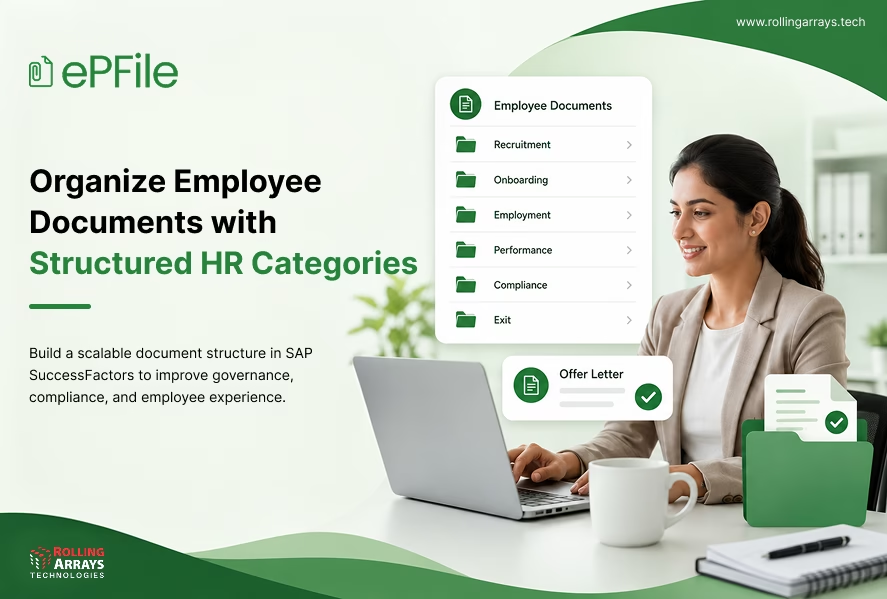
Employee Documents
- Recruitment
- Onboarding
- Employment
- Performance
- Compliance
- Exit
This approach creates a predictable document structure that remains manageable even as organizations grow across multiple business units and countries.
Best Practices for Organizing HR Document Categories
Creating document categories is only the first step. To keep employee records organized and easy to manage over time, organizations should establish clear standards for document naming, storage, access, and retention.
Use Standardized Naming Conventions
Consistent file names make documents easier to identify and retrieve.
For example, instead of saving documents as:
- Contract_Final.pdf
- Offer_New.pdf
- Letter_v3.pdf
Organizations can adopt a standardized format such as:
Employee ID – Document Type – Date
Examples:
- EMP10245_OfferLetter_2026
- EMP10245_PromotionLetter_2027
- EMP10245_SalaryRevision_2028
Standardized naming reduces duplication and improves document discoverability.
Centralize Document Storage
Employee documents should remain within a centralized repository instead of being distributed across email inboxes, shared folders, and local devices.
Centralized storage enables organizations to:
- Maintain a single source of truth
- Improve document visibility
- Simplify document retrieval
- Reduce duplicate files
- Support document governance
This becomes increasingly valuable as document volumes grow.
Apply Role Based Access
Not every employee should have access to every document. Role-based permissions help organizations protect confidential information while ensuring employees and managers can access the records they need.
A well-defined permission structure typically includes:
Employees can securely access their own employment documents through self-service.
Managers can view documents related to their direct reports, based on organizational policies.
HR teams can access employee records required to support HR operations and compliance.
HR administrators can manage document categories, permissions, workflows, and overall document governance.
A structured permission model strengthens security while improving collaboration and operational efficiency.
Automate Document Workflows
Many HR documents follow a predictable lifecycle.
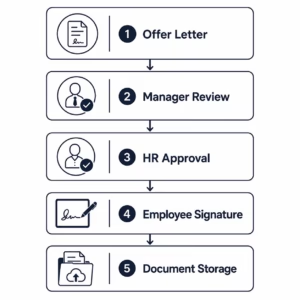
Automating these workflows reduces manual coordination while improving consistency and visibility throughout the document lifecycle.
Extending SAP SuccessFactors with Intelligent Document Management
SAP SuccessFactors provides a strong foundation for managing employee data and core HR processes. As organizations expand, many extend their existing HR environment with intelligent document management capabilities to better organize employee records.
ePFile by Rolling Arrays Technologies helps organizations:
- Organize employee documents using structured categories and folders
- Centralize employee document management
- Generate documents using AI-powered templates
- Retrieve documents quickly through intelligent search
- Automate approval workflows
- Enable digital signatures
- Secure documents through role-based access controls
By bringing document generation, storage, retrieval, and governance into one connected environment, organizations can maintain a scalable document structure while continuing to work within SAP SuccessFactors.
Benefits of a Structured HR Document Category Framework
Organizations that implement well-defined document categories experience improvements across HR operations.
Faster Document Retrieval
Structured folders and categories reduce the time spent searching for employee documents.
Better Document Governance
Consistent categorization supports document ownership, access controls, and lifecycle management.
Improved Compliance
Standardized document organization helps organizations maintain complete employee records while supporting audit readiness.
Enhanced Employee Experience
Employees receive faster responses when HR teams can quickly locate employment letters, contracts, and other important documents.
Scalable HR Operations
A consistent folder structure enables organizations to manage growing document volumes across departments, countries, and business units.
Best Practices Checklist for HR Document Management
Organizations can build a scalable and efficient document management framework by following these best practices:
- Define standardized HR document categories to maintain consistency throughout the employee lifecycle.
- Create a logical folder structure that makes employee documents easy to organize and retrieve.
- Use standardized naming conventions to reduce duplicate files and simplify document searches.
- Centralize employee document storage to maintain a single source of truth.
- Implement role-based access controls to protect confidential employee information.
- Automate document workflows to reduce manual coordination and improve process efficiency.
- Enable intelligent search to quickly locate employee documents using filters and keywords.
- Review document retention policies regularly to support governance and compliance requirements.
Following these practices helps organizations improve document governance, strengthen compliance, and create a more efficient employee document management process.
Conclusion
A well-structured approach to HR document categories helps organizations do more than organize files. It improves document retrieval, strengthens governance, supports compliance, and creates a better experience for HR teams, managers, and employees.
As document volumes continue to grow, organizations need scalable document management practices that go beyond basic folder structures. Standardized categories, centralized storage, intelligent search, and workflow automation help create a connected and efficient document management environment.
ePFile by Rolling Arrays Technologies extends SAP SuccessFactors with intelligent document management capabilities, enabling organizations to organize, generate, retrieve, and govern employee documents through a secure, centralized platform.
Looking to organize employee documents more efficiently within SAP SuccessFactors?
Discover how ePFile helps organizations centralize employee document management, automate document generation, simplify document retrieval, and strengthen governance with intelligent document management capabilities.
Explore ePFile or connect with our team to learn more.
Frequently Asked Questions About SAP SuccessFactors Document Management
What are HR document categories?
HR document categories are logical classifications used to organize employee documents throughout the employee lifecycle. Common categories include recruitment, onboarding, employment records, compliance, performance, and separation documents.
Why is a structured folder structure important in SAP SuccessFactors?
A structured folder structure helps HR teams organize employee records consistently, improve document retrieval, reduce duplicate files, and strengthen document governance as organizations grow.
What is the best way to organize employee documents?
Organizations should group documents by category, use standardized naming conventions, centralize document storage, implement role-based access controls, and automate document workflows wherever possible.
How can organizations improve HR document management?
Can SAP SuccessFactors support structured HR document management?
Yes. SAP SuccessFactors provides the foundation for managing employee data, and organizations can extend it with intelligent document management solutions to organize, generate, retrieve, and govern employee documents more effectively.
How does ePFile support HR document management?
ePFile by Rolling Arrays Technologies extends SAP SuccessFactors with AI-powered document generation, structured document categories, centralized document management, intelligent search, workflow automation, digital signatures, and role-based security to simplify the complete employee document lifecycle.



One Comment