

Employees have different priorities at different stages of their lives. One employee may value medical coverage for their family, while another may prioritize wellness benefits, learning opportunities, or additional financial support. A benefits program that offers the same options to everyone may not reflect these differences.
For HR leaders, the challenge is to offer meaningful choices without making benefits administration more complicated. Benefit selection, eligibility, employee contributions, approval workflows, and reporting all need to work together. When these processes rely on disconnected systems or manual intervention, flexibility can create additional work for HR and Finance.
SAP SuccessFactors provides an established HR technology environment for managing employee information and related HR processes. Organizations looking to introduce more flexible benefits can assess how their existing configuration supports the intended program and where additional capabilities may be required.
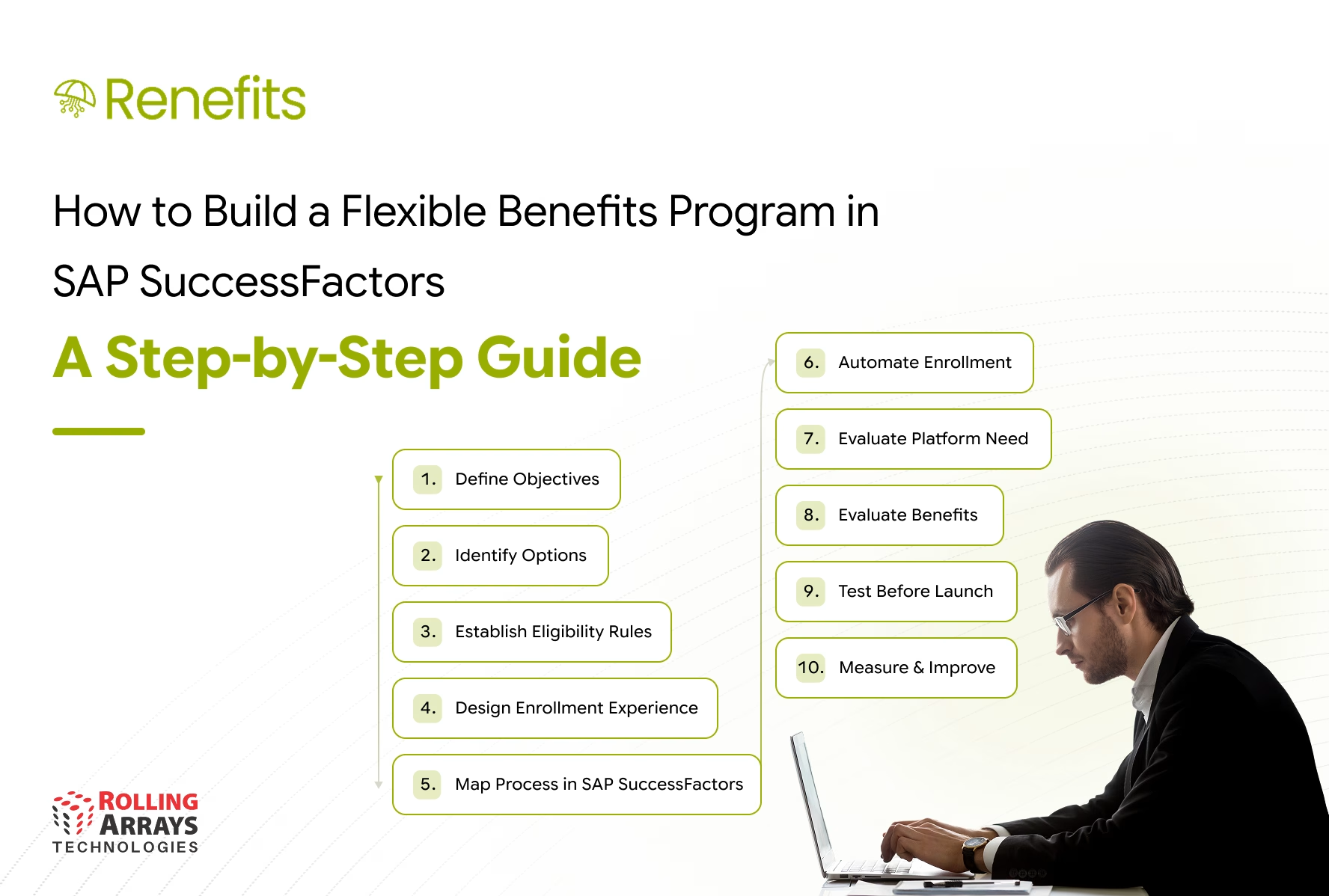
This guide explains how to approach flexible benefits program design in SAP SuccessFactors, from understanding employee needs and defining benefit options to implementing enrollment workflows and evaluating the role of a flexible benefits platform such as Renefits.
What Are Flexible Employee Benefits?
Flexible employee benefits allow employees to select from a defined range of benefits according to their eligibility, personal priorities, and the rules of the organization’s benefits program.
Instead of offering an identical benefits package to every employee, organizations can establish a framework that gives employees meaningful choices while maintaining control over budgets, eligibility, and policy requirements.
Depending on the organization, a flexible benefits program may include:
- Medical, dental, and vision coverage
- Dependent and family benefits
- Wellness and fitness allowances
- Learning and professional development support
- Lifestyle or wellbeing benefits
- Flexible allowances or reimbursement based benefits, where permitted by company policy and local regulations
The specific options depend on the employer’s compensation philosophy, workforce needs, local requirements, and available budget.
A flexible benefits program does not mean employees can choose any benefit without restrictions. HR must define the available options, eligibility criteria, allocation limits, enrollment windows, and approval requirements before employees make their selections.
For CHROs, the objective is to balance employee choice with consistent governance and manageable administration.
Step 1: Define the Objectives of Your Benefits Program
Before configuring systems or selecting a flexible benefits platform, clarify what the organization wants to achieve.
A benefits program should address a business or workforce need rather than simply introduce more choices.
Start by identifying the outcomes that matter most to HR leadership.
Improve employee experience
Employees need to understand which benefits are available, how they can select them, and what each option means for them. A clear selection process can make benefits easier to access and reduce repetitive queries to HR.
Support different workforce needs
Workforces may include early career employees, employees with dependents, experienced professionals, and employees working across different locations. Their priorities may differ considerably.
Use employee surveys, existing benefits utilization data, and feedback from HR business partners to understand these differences.
Improve administrative efficiency
Assess the time HR spends managing enrollment, checking eligibility, collecting supporting documents, resolving discrepancies, and answering employee questions.
A well designed program should make these processes easier to manage rather than create additional manual work.
Strengthen cost control and governance
HR and Finance need visibility into benefit allocations, employee selections, spending limits, and exceptions. Define the controls required before expanding the range of available benefits.
The outcome: Document the business objectives, employee needs, budget constraints, and measures of success before moving to program design.
Step 2: Identify the Benefits Employees Can Choose
The next step is to establish the benefit options that employees can select.
Avoid designing the program around the maximum number of choices. Too many options can confuse employees and increase administrative complexity. Instead, prioritize benefits that reflect workforce needs and can be administered consistently.
Create clear benefit categories
Group the available options into understandable categories, such as healthcare, family support, wellness, learning, and lifestyle benefits.
For each option, document:
- What the benefit covers
- Which employees can access it
- Whether the organization provides a fixed allowance or contribution
- Any employee contribution or spending limit
- The documents required, if applicable
- The selection and approval process
- Any applicable tax, payroll, or local compliance considerations
Decide how employees will make their choices
Organizations can structure benefits in several ways.
Core benefits with optional additions: Every eligible employee receives a standard package and can select additional benefits.
Flexible allowance: Eligible employees receive a defined allocation that they can distribute among approved benefit options.
Tiered benefit packages: Employees choose from predefined packages designed around different levels of coverage or available spending.
The appropriate model depends on the organization’s compensation strategy, workforce profile, budget, and local requirements.
For multinational organizations, the design may also need to accommodate differences in benefit availability and policy requirements across countries.
Step 3: Establish Benefits Eligibility Rules
Flexible benefits only work when employees understand which options they can select and HR can apply the rules consistently.
Benefits eligibility rules should determine who qualifies for each benefit and under what conditions.
Depending on organizational policy, eligibility may depend on:
- Employment type or worker category
- Job level or employee grade
- Country or work location
- Length of service
- Employment status
- Dependent eligibility
- Benefit-specific conditions
- Enrollment period or qualifying life events
For example, an organization may offer a family medical benefit to eligible employees while restricting a particular allowance to specific employee groups.
These rules should be documented clearly before configuration begins.
Account for employee changes
Eligibility can change when an employee joins, changes roles, moves to another location, adds a dependent, or leaves the organization.
Define how these events affect benefit access, existing selections, and available allowances. Also establish who reviews exceptions and how changes are communicated to employees.
Validate rules before launch
Test representative employee scenarios before opening enrollment. Include employees from different locations, worker categories, and eligibility groups.
Confirm that employees see the correct options and that ineligible selections are restricted according to policy.
A clear eligibility framework reduces disputes, helps maintain consistent administration, and gives HR better control over benefit entitlements.
Step 4: Design the Employee Enrollment Experience
Even a well designed benefits program can underperform if employees find enrollment difficult.
Employees should be able to understand their options, compare available benefits, make selections, and complete the required steps without repeatedly contacting HR.
Make benefit information easy to understand
Use clear descriptions of coverage, allowances, limits, eligibility conditions, and important dates. Explain what employees need to do and what happens after they submit their selections.
Avoid relying on policy documents alone to communicate the details of each benefit.
Define enrollment windows and deadlines
Establish when employees can enroll, change selections, or submit supporting documents. Where policy permits, determine how qualifying life events affect enrollment outside the normal window.
Communicate deadlines early and provide reminders before enrollment closes.
Provide visibility into selection status
Employees should understand whether their selections are saved, submitted, pending approval, or completed, where the underlying system supports these status updates.
Clear status information can reduce uncertainty and repetitive follow up with HR.
Support employees across locations
For organizations operating across countries, review language, benefit terminology, local policy differences, and the availability of country specific options.
This is particularly relevant when designing Flexible Benefits in APAC, where organizations may need to manage different employment practices and benefit arrangements across markets.
The goal is a consistent enrollment experience without assuming that every country should offer identical benefits.
Step 5: Map the Process in SAP SuccessFactors
Once the program design is established, determine how the process should operate within the existing SAP SuccessFactors environment.
Start with the employee and organizational data already maintained in the HR system. Identify which information drives eligibility, which systems hold benefit details, and where updates need to flow.
Do not begin by assuming that every requirement needs an additional application. First assess what the current configuration and connected systems can support.
Map the end to end workflow
Document the process from the point an employee becomes eligible to the point a selection is approved, recorded, and reflected in downstream processes where applicable.
The workflow may include:
- Identifying eligible employees.
- Presenting the benefits available to each employee.
- Allowing employees to submit their selections.
- Collecting supporting documents when required.
- Routing selections for approval where policy requires it.
- Recording approved selections and updating relevant records.
- Providing reporting for HR and Finance.
- Managing changes, exceptions, and subsequent enrollment periods.
Assign an owner to each stage. Clarify which actions belong to HR, employees, managers, Finance, payroll teams, or external benefit providers.
Assess integration and data ownership
Define which system is responsible for maintaining employee information, eligibility rules, benefit selections, claims, and relevant financial records.
If additional tools are involved, document how information moves between them, how errors are identified, and who resolves discrepancies.
Integration requirements should be validated against the actual systems, configuration, and approved technical design. Avoid assuming that every data field or workflow is automatically available through the standard setup.
Step 6: Identify Where Benefits Enrollment Automation Is Needed
Manual intervention can become difficult to manage as the number of benefit options, employee groups, and enrollment events increases.
Benefits enrollment automation can help standardize recurring activities, provided the underlying policies and rules are clear.
Prioritize the processes that create the greatest administrative burden or risk.
Eligibility checks
Use defined rules to determine which benefits employees can access. This reduces repeated manual verification, subject to the quality of the underlying employee data and configuration.
Selection and approval workflows
Establish clear routing for selections that require approval. Define who can approve, what happens when information is incomplete, and how exceptions are handled.
Supporting documents
Where a benefit requires evidence or receipts, establish how employees submit documents, how reviewers validate them, and how records are retained.
Notifications and reminders
Communicate enrollment opening dates, pending actions, missing information, and closing deadlines through the available system capabilities.
Reporting and reconciliation
Give HR and Finance a consistent view of employee selections, benefit allocations, pending approvals, and relevant exceptions. Where benefit selections affect payroll or external providers, define the necessary validation and reconciliation steps.
Automation should not simply digitize an unclear process. Review the rules and approval requirements first, then automate the steps that are sufficiently standardized.
Step 7: Determine Whether You Need a Flexible Benefits Platform
After mapping the process, compare the required capabilities with what your current SAP SuccessFactors configuration and connected systems can support.
The objective is not to introduce another tool by default. It is to identify whether a genuine capability gap affects employee experience, operational efficiency, governance, or the ability to deliver the intended benefits program.
A flexible benefits platform may be worth evaluating when:
- Employees need to select from a wider range of configurable benefits.
- Eligibility and entitlement rules are difficult to administer consistently.
- Enrollment requires multiple disconnected forms or manual handoffs.
- Supporting documents and approvals are handled through separate processes.
- HR lacks a consolidated view of selections and outstanding actions.
- Repeated workarounds make policy changes difficult to implement.
- The organization needs a more structured approach to benefits administration across employee groups.
Before extending the existing environment, distinguish between a configuration issue, a process design problem, an integration requirement, and a genuine capability gap.
If a configuration change or process improvement resolves the issue, an additional platform may not be necessary.
If the gap remains, evaluate whether a complementary solution can meet the requirement while preserving the role of SAP SuccessFactors in the wider HR environment.
Step 8: Evaluate Renefits for Benefits Administration
Renefits is designed to complement SAP SuccessFactors by extending benefits administration capabilities.
For organizations implementing a flexible benefits program, Renefits can be evaluated against requirements such as benefit plan configuration, eligibility and entitlement management, claims administration, supporting documents, approval workflows, employee self service, and reporting.
The relevant capabilities and their fit should be confirmed against the organization’s program design and the product’s current supported functionality.
Connect the solution to the business requirement
Rather than selecting a platform based on a long feature list, evaluate how it addresses the problems identified in the earlier steps.
For example:
- If eligibility decisions require repeated manual checks, assess how benefit eligibility and entitlement rules can be managed.
- If employees struggle to submit claims or supporting documents, assess the available employee submission and document handling workflows.
- If approvals are spread across emails and separate tools, assess how the proposed solution supports the required approval process.
- If HR cannot easily monitor benefit activity, assess the available reporting and visibility.
- If the organization operates across multiple employee groups, validate whether the required policy variations can be supported.
Preserve a coherent HR technology environment
A benefits extension should work with the organization’s broader HR processes rather than create another disconnected source of employee information.
Review data ownership, integration requirements, access controls, reporting responsibilities, and support arrangements before implementation.
Renefits should be assessed as part of this wider design, with SAP SuccessFactors continuing to play its intended role in the HR technology landscape.
Step 9: Test the Program Before Launch
Before opening enrollment to the entire workforce, test the program with representative employee scenarios.
Testing should cover both the intended employee experience and the administrative controls behind it.
Include scenarios such as:
- An employee who qualifies for all standard benefits
- An employee who is eligible for only selected options
- An employee with eligible dependents
- An employee who changes roles or locations
- An employee who submits an incomplete selection
- A benefit that requires supporting documentation
- A selection that requires approval
- An employee who changes a selection within the permitted window
- An exception that requires HR review
Verify the eligibility results, available options, allocation limits, approval routing, employee notifications, and relevant reporting.
Where integrations are involved, test data movement and reconciliation as well. Confirm how failed updates or inconsistent records are identified and resolved.
A pilot with a representative employee group can help uncover problems before the program is rolled out more widely.
Step 10: Measure Adoption and Improve the Program
Launching a flexible benefits program is not the end of the process. HR leaders need to understand whether the program delivers value to employees and whether the administrative model remains manageable.
Establish a baseline before launch and track results after implementation.
Useful measures may include:
- Enrollment completion rate
- Employee participation by benefit category
- Time taken to complete enrollment
- Number of incomplete submissions
- Pending approval volumes
- Benefits related employee queries
- Administrative effort required per enrollment cycle
- Benefit utilization, where reliable data is available
- Cost against the approved benefits budget
- Frequency of eligibility or entitlement corrections
Interpret these measures in context. For example, low participation in a benefit may indicate limited employee demand, poor communication, confusing eligibility conditions, or a selection process that needs improvement.
Use employee feedback and operational data to refine the program over time. Review whether the available options remain relevant, whether eligibility rules are working as intended, and whether the enrollment experience needs further simplification.
Common Mistakes to Avoid When Designing Flexible Benefits
A flexible benefits program can become difficult to administer when organizations expand choices without establishing the necessary operating rules.
Offering too many options without a clear structure: Start with benefits that address demonstrated employee needs and can be administered reliably.
Applying unclear eligibility rules: Document who qualifies for each benefit and how changes in employment or personal circumstances affect eligibility.
Automating before reviewing the process: Resolve unclear ownership, redundant approvals, and inconsistent policy requirements before introducing automation.
Ignoring the employee experience: Clear descriptions, straightforward enrollment steps, timely reminders, and transparent status updates matter as much as the underlying workflow.
Assuming every country can follow the same model: Define common principles while accounting for local benefit arrangements and applicable requirements.
Adding another platform without validating the gap: Evaluate the existing SAP SuccessFactors setup first and introduce an extension only when it addresses a defined requirement.
Measuring implementation rather than outcomes: A successful launch does not automatically mean employees are using the program effectively or HR is spending less time on administration.
Conclusion: Build Flexibility Around Employee Needs and Operational Control
A successful flexible benefits program begins with a clear understanding of employee needs, organizational priorities, eligibility requirements, and administrative constraints.
SAP SuccessFactors provides the existing HR environment against which organizations can assess their benefits processes. HR leaders should define the program, map the required workflows, validate eligibility rules, and identify gaps before deciding whether additional capabilities are necessary.
Where the current setup does not adequately support the intended process, a complementary flexible benefits platform can help address specific administration and employee experience requirements.
Renefits extends SAP SuccessFactors with benefits administration capabilities that organizations can evaluate against their requirements for benefit plans, eligibility, entitlements, claims, workflows, employee self service, and reporting.
The objective is not simply to offer more choices. It is to create a benefits program that employees can navigate confidently and HR can administer consistently, with the controls and visibility the organization needs.
Speak with our team to explore how your organization can improve benefits administration within its HR technology environment.
Frequently Asked Questions
What are flexible employee benefits?
Flexible employee benefits allow eligible employees to select from a defined range of benefits based on their needs and the organization’s policies. Depending on the program, employees may choose from healthcare, family support, wellness, learning, or other approved benefit options.
How can an organization build a flexible benefits program in SAP SuccessFactors?
Start by defining program objectives, identifying employee needs, selecting benefit options, and establishing eligibility rules. Then map enrollment and approval workflows, assess existing SAP SuccessFactors capabilities, validate integration requirements, test the process, and measure adoption after launch.
What role do benefits eligibility rules play in a flexible benefits program?
Benefits eligibility rules determine which employees can access specific benefits and under what conditions. Clear rules help organizations apply policies consistently, control entitlements, and reduce manual verification and eligibility disputes.
How does benefits enrollment automation help HR teams?
Benefits enrollment automation can standardize recurring tasks such as eligibility checks, submission workflows, approvals, reminders, and reporting. Its effectiveness depends on clear policies, accurate employee data, and appropriate system configuration.
What should organizations look for in a flexible benefits platform?
Evaluate benefit configuration, eligibility and entitlement management, enrollment workflows, document handling, employee self service, reporting, integration requirements, security, and support. The platform should address defined business needs and fit the organization’s existing HR technology environment.
Can Renefits complement SAP SuccessFactors?
Renefits is designed to extend SAP SuccessFactors with benefits administration capabilities. Organizations can evaluate its fit against requirements for benefit plans, eligibility, entitlements, claims, supporting documents, approval workflows, employee self service, and reporting.
What should organizations consider when designing Flexible Benefits in APAC?
Organizations operating across APAC should consider differences in workforce needs, benefit arrangements, employee categories, local requirements, and administration practices. A consistent program framework can support governance while allowing appropriate variation by country and employee group.


